Your first week with Buiiild
The fourteen steps that get your salon ready to work, in order: contact details, hours, services, photos, team and schedule, legal notice, till, online booking, then your real clients. A guide for each step.
In this article
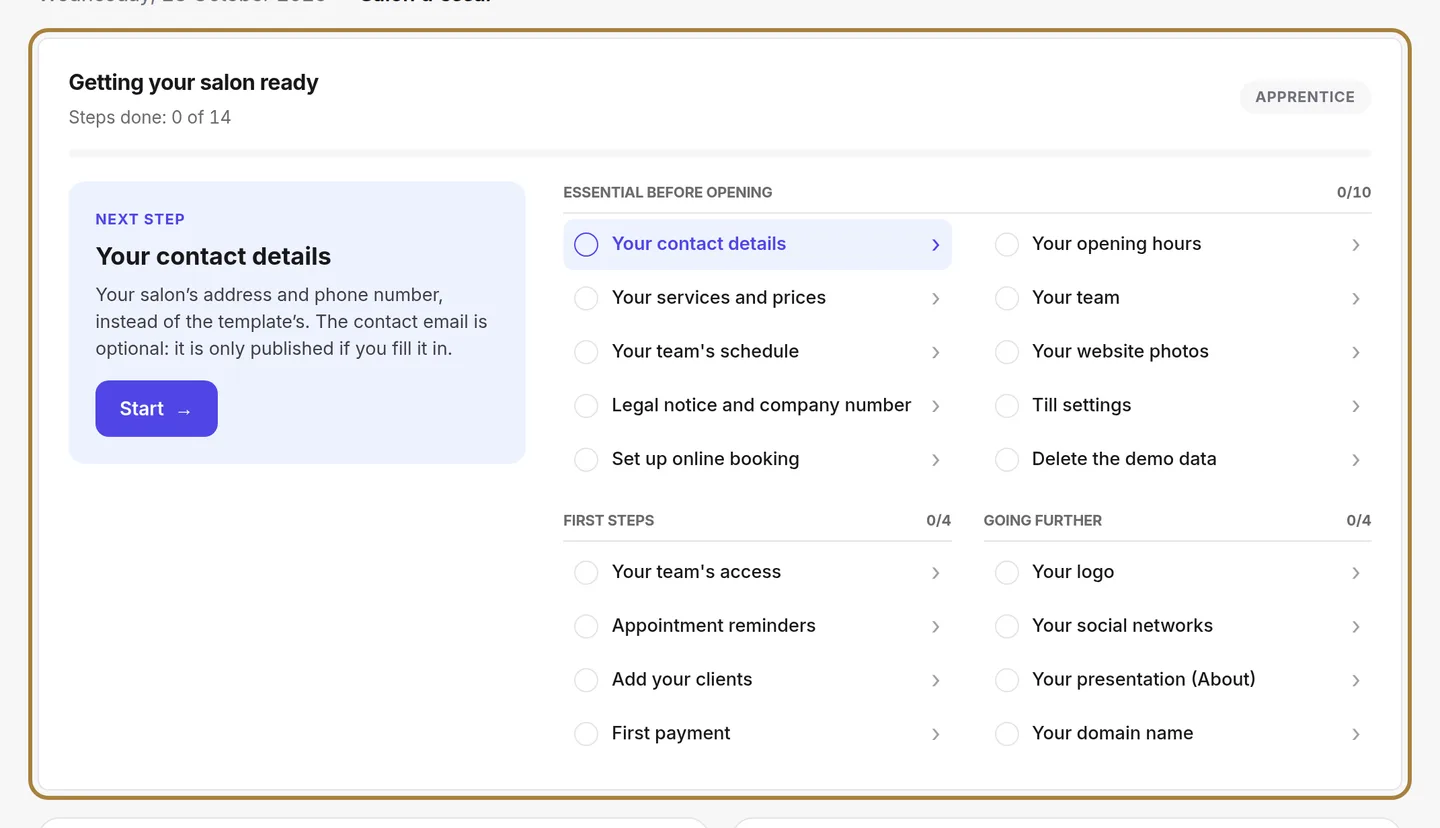
Fourteen steps get your salon ready to work. The Getting your salon ready block on your dashboard tracks them for you: it shows the next step, opens the right screen and disappears once everything is done. A step is only ticked when you have set the value: what the template pre-filled doesn't count.
Day 1 — What your clients see
- Your contact details: your salon's address, phone and email, instead of the template's. → The salon's contact details
- Your opening hours: your calendar and online booking depend on them. → The salon's hours and exceptional closures
- Your services and prices: clear names, real durations, your prices. → Services and prices: your catalogue
- Your website photos: replace the sample slideshow photos with photos of your salon. → The homepage slideshow
Day 2 — The team and the till
- Your team: one profile per person, with their name and photo. Remove the sample members with Remove from team. → Adding a team member
- Your team's schedule: each person's working days. Without a schedule, online booking offers no slots for that person. → The team's schedule: hours and time off
- Till settings: legal form, company number, VAT and payment methods, printed on every receipt. → Setting up the till: SIRET, VAT, payment methods, penalties
Day 3 — Opening to clients
- Set up online booking: lead times, deposit and cancellation, then share your link. → Turning on online booking
- Clear the demonstration data with the button at the top of the dashboard. The sample appointments, clients, team and services go, and the whole demonstration till resets with them (receipts, closings, numbering): you start again from an empty menu. Everything you added or edited stays. Past your first real sale, this button is refused: the till can no longer be cleared.
The rest of the week — First steps
- Your team's access: one account per person to sign in to the studio. If you work alone, there is nothing to do. → Roles and access to the studio
- Appointment reminders: choose when they go out, by email or text. → Automatic SMS: reminders, confirmations, thank-yous
- Add your clients: import your client list or create your first client record. → Importing your clients from another system
Going further
These four steps are optional: they don't count towards your progress.
- Your logo, instead of the template's. → Logo and site appearance
- Your social networks, linked to your website. → The salon's contact details
- Your domain name, for example mysalon.com. → Your own domain name
- Your online shop, to sell your products on your website. → Opening your online shop
Frequently asked questions
Where do I start if I'm new?
With the next step shown on your dashboard. At first, that's your contact details, your hours and your services: it's what a client sees on their very first visit.
Why does a step stay unticked when the screen is filled in?
Because those values come from the template. A step is only ticked once you have set the value yourself: open the screen, check it, then save.
When should I clear the demonstration data?
As soon as you are ready for real clients, with the Delete the demo data button at the top of the dashboard. Then set up your team's schedule again: it goes with the sample data. Act before your first real sale: past that point, the demonstration till (receipts marked "DEMONSTRATION", closings, numbering) can no longer be cleared, so a real record is never erased.
Will the setup block stay on my dashboard?
No. It disappears by itself once the fourteen steps are done. The four optional steps don't keep it there.
Go further
The dashboard, the menu, the bell, the "View my site" button: five minutes to find your way around your salon's software.
Salon settingsThe salon's contact detailsAddress, phone, email, social networks: everything that lets a client find and reach you. Used on the contact page, the footer, the map and the directory listing.
Online bookingTurning on online bookingWhat happens when a client taps "Book an appointment" on your site: your calendar, your phone, another service, or nothing. You can change it whenever you like.
Need a hand?
Write to us from your studio, under “Help & support”: we answer quickly, with real people.