
Buiiild features
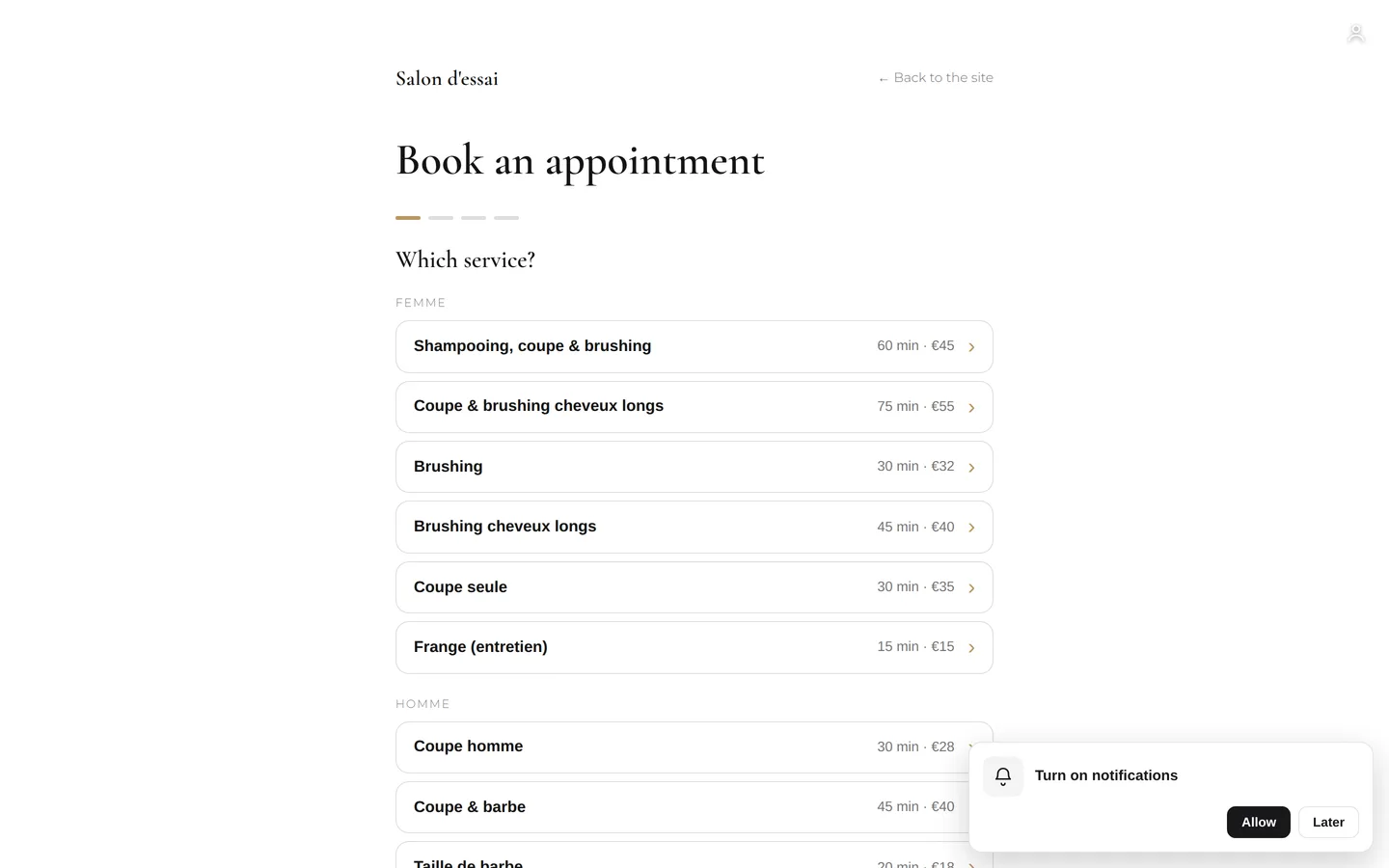
24/7 online booking Clients book on their own, day and night.
On your website, clients choose their service, team member, day and time, then get their confirmation. You set the rules: slot length, notice period, an online deposit paid into your own Stripe, PayPal or Viva account, cancellation policy.
On video · 2 min 16 s
Turning on online booking
What happens when a client taps "Book an appointment" on your site: your calendar, your phone, another service, or nothing. You can change it whenever you like.
Step by step
Every screen, explained
The help centre guides that cover this feature in detail, with screenshots.
- What your client sees when they bookThe booking journey on your public site: service, stylist, day, slot, contact details, confirmation — and what they receive afterwards.Read the guide
 Booking settings: slots, delays, deposit, cancellationThe slot interval, the buffer, the notice period, the horizon, automatic switching to kept, the deposit, the cancellation policy and notifying of moves.Read the guide
 Booking links to shareYour addresses for getting booked: to paste into Instagram, Facebook, your Google listing, your email signature. One link per service, and the right way to copy without mistakes.Read the guide
 Taking a deposit online: connecting Stripe, PayPal or VivaThe money goes to your bank account, not Buiiild's. Choosing the provider, setting up the application, understanding where the money goes.Read the guide
Frequently asked questions
The screen says online booking isn't installed
It's turned on salon by salon: write to us from Exchanges › Help & support and we'll turn it on for you.
Can I require confirming every request?
Yes: the booking "confirmation" setting decides whether an online request arrives as "To confirm" or already confirmed.
Can my clients cancel online?
Yes, up until the cancellation delay you set in the booking settings. Below that, they're invited to call the salon.
How do I check for myself what my clients see?
Open your site from View my site at the top of the studio, and book like a client, ideally from your phone: it's the only way to see exactly what they see.
Which interval should I choose?
The most common is 15 minutes: fine enough to fit in a men's cut, wide enough to stay readable. A 30-minute interval suits a salon where every service lasts at least half an hour.
Why use the Copy button instead of copying the address by hand?
One extra letter, and your Instagram post leads to an error page all weekend. The Copy button puts the exact address on the clipboard, with no risk of a typo.
Make room for what is next
Your next chapter bears your salon’s name.
Create your website. Discover your Studio. You have 30 days to decide for yourself.
Create my salon