The sales journal: receipts, drafts, unpaid, credit notes
Finding a receipt by number, name or amount; reprinting a duplicate; following up an unpaid one; issuing a credit note; reading the fingerprint that stands as proof.
In this article
The journal keeps everything the till has produced. This is where you find "last week's invoice", follow up an unpaid one, and cancel a sale — with a credit note, never by editing the receipt.
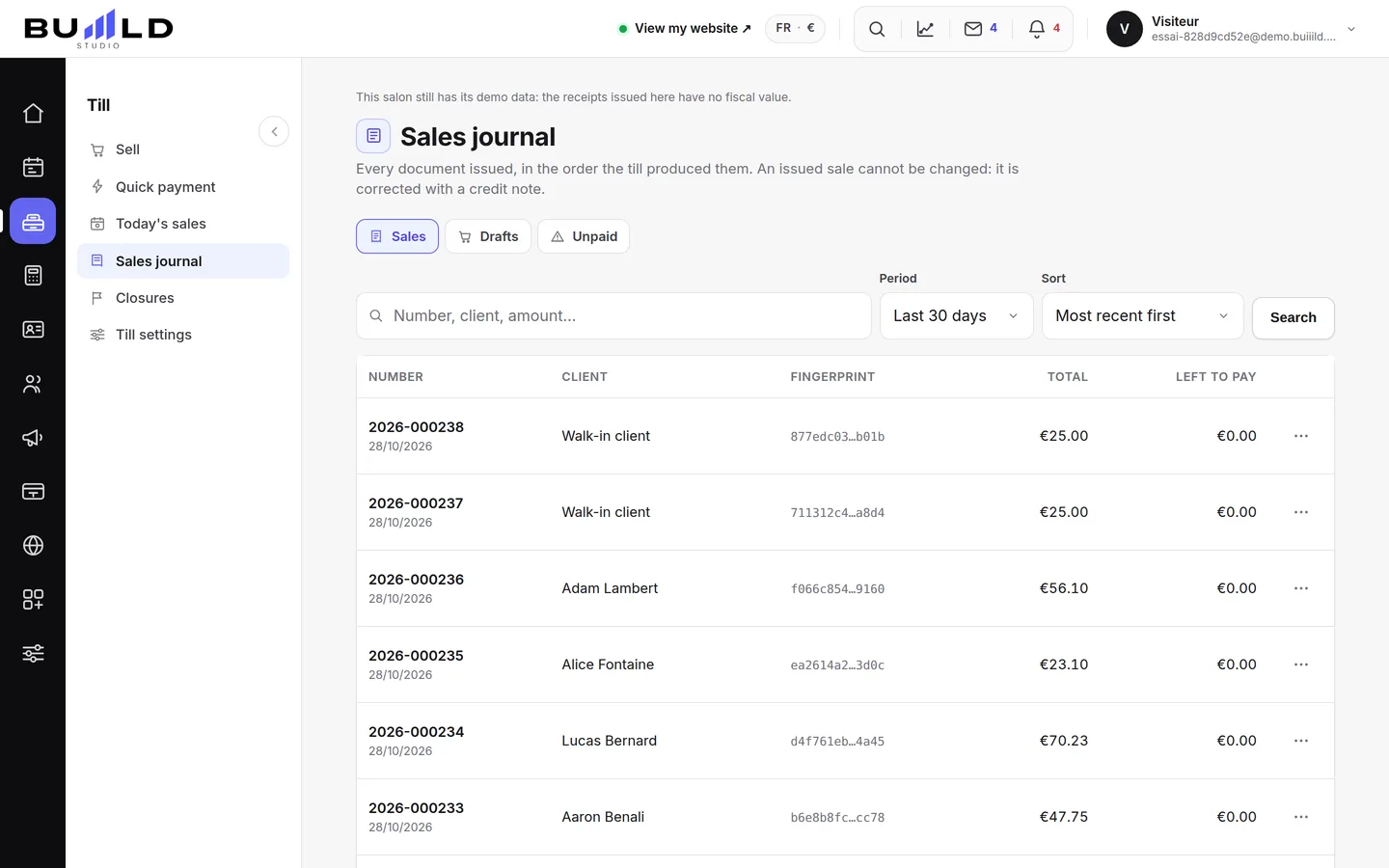
Three kinds of documents

- Sales are issued documents, final.
- Drafts are baskets set aside: they have no number and no legal value, and can be discarded.
- Unpaid are properly issued documents still missing payment — your follow-up list.
Finding a receipt

Search by number, by client name or by amount. This is the "she's asking me for her invoice from last week" move: you reopen the document and reprint it as a duplicate (numbered too).
The period and the sort: seven days, thirty days, the month or the whole history, from most recent to largest amount. The choice stays in the page's address: the link can be shared with your accountant, and going back works.
Each line leads to its document

The number opens the detail: lines sold, payments received, duplicates already printed. This is where a credit note is issued when a sale needs cancelling — never by editing the original receipt.
The fingerprint, your proof
This code is the link connecting this document to the previous one. It's what proves no sale was deleted or backdated between the two, as required by article 286 I-3° bis of the French tax code. You have nothing to do with it day to day: it serves on the day of an audit (see Till compliance).
Frequently asked questions
How do I cancel a sale?
Open the receipt, issue a credit note: it cancels all or part of the sale, with its own number. The original receipt stays in the journal, struck through by the credit note.
The client wants an invoice in her company's name
Link the sale to her client record, whose address and name print on the document. The salon's details (SIRET, VAT) come from the till settings.
Go further
Basket, tip, payment: a sale in three steps. Until you've taken payment, nothing is issued; after that, the receipt is final.
Till and paymentsClosings: days, months, and the chain of ZsOne or more till "Z" readings a day depending on your sessions, closings that chain themselves on their own, month after year, and the perpetual grand total.
Till and paymentsTill compliance and the certificateUnalterability, security, retention, archiving: what the till guarantees, the extended integrity check you can rerun, the archive of a period, the FEC file and the certificate to print.
Need a hand?
Write to us from your studio, under “Help & support”: we answer quickly, with real people.