"Creating a promotion: last minute, happy hours, flash sale, premium hours"
Four mechanics for filling quiet hours — or charging more for the ones everyone wants. What each promotion applies, what it brings in and what it costs.
In this article
Four mechanics for bringing people in when the salon is empty: flash sale on set dates, happy hours on time slots, last minute on slots about to stay empty, and premium rate on the hours everyone wants.

What each promotion applies

The line states the mechanic and the exact rule: the days, the hours, the percentage. Reread it before turning it on — it's what will be charged to your clients.
What it brought in, what it cost

The number of appointments obtained, the revenue, and the discount given. A promotion that brings in ten appointments while costing you two hundred euros in discounts isn't necessarily a good deal: this is where you see it.
Starting, stopping
An active promotion applies immediately on online booking. Stopping it never affects appointments already booked at that rate: what's sold stays sold.
Creating one

- The mechanic decides everything. Last minute to save a slot about to stay empty, happy hours to fill a quiet day every week, flash sale for a dated campaign, premium hours to charge more on Saturday. The first three lower the price, the last raises it.
- The name, seen by your clients. This title shows on online booking, next to the struck-through price. State the benefit, not the mechanic: "-20% on Tuesdays" is understood, "Tuesday happy hours" much less so.
- By how much. The percentage applies to the price of each service ticked below. Calculate it against your margin, not the price: at -30%, a €30 cut leaves you €21 for the same amount of work.
- When it's offered. Two dates bound the period the promotion is sold in. Set an end date: it's what stops discounts being forgotten for six months.
- On which services. Tick nothing and the promotion covers your whole catalogue. Tick to limit it to the services you want to push — a colour, a treatment — without discounting your cuts.
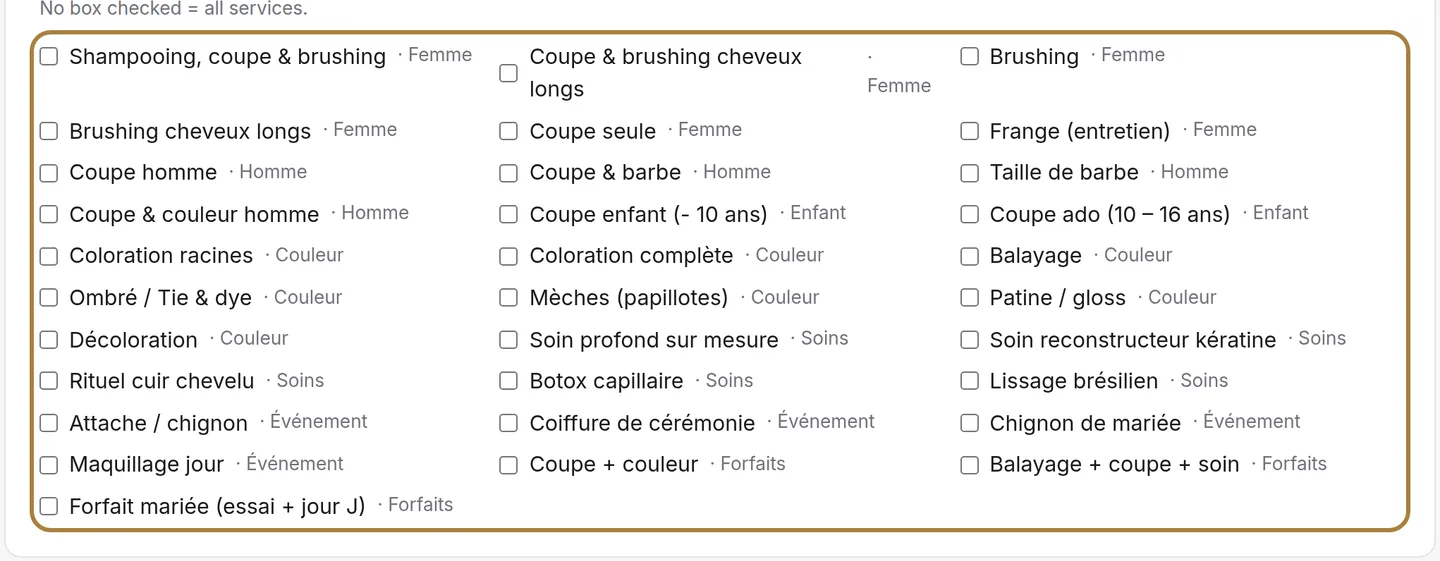
On which services.
Frequently asked questions
Which mechanic for a slot that's about to stay empty?
Last minute: it only discounts what was going to stay empty, so it never costs you anything when the salon is already full.
If I stop a promotion, does the price change for appointments already booked?
No. Stopping a promotion never affects appointments already booked at that rate: what's sold stays sold.
Can I limit a promotion to certain services?
Yes, by ticking the services you want. With nothing ticked, the promotion applies to your whole catalogue.
Should I always set an end date?
Yes, it's strongly recommended: it's what stops a discount being forgotten for months.
Go further
Seven levers gathered on one screen: reviews, client file, automatic messages, promotions, visuals, newsletter. Where you really stand, and where to start.
Messaging and SMSSending an SMS to a client or a listAn offer, a freed-up slot, a word to one specific person: you write it, the message goes out in the salon's name. Recipients, preview, cost, confirmation.
Calendar and appointmentsReading the occupancy rateAre my chairs full? The occupancy rate today and over the week, by stylist, by day, and the trend over eight weeks.
Need a hand?
Write to us from your studio, under “Help & support”: we answer quickly, with real people.